Đội ngũ & Quyền hạn
Làm việc như một đội ngũ, với kiểm soát tuyệt đối
Mời đội ngũ của bạn. Gán vai trò. Theo dõi mọi hành động. Tất cả giao dịch được ghi để tuân thủ và trách nhiệm vận hành trên cả kho và cửa hàng.
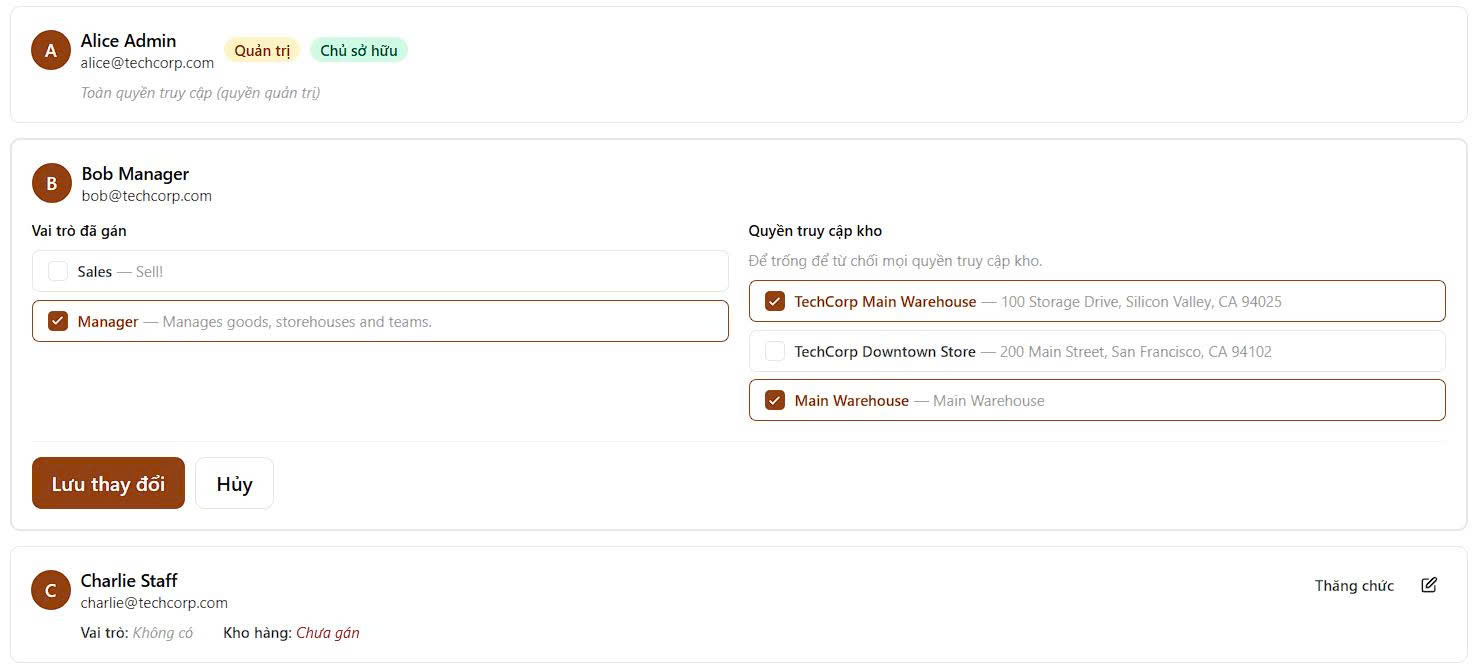
Vai trò được xây dựng trước
Vai trò Quản trị, Giám sát, Người vận hành, và Người xem đã sẵn sàng sử dụng. Gán thành viên đội ngũ linh hoạt bất cứ lúc nào.
- Bắt đầu với bộ vai trò mẫu đã kiểm chứng cho các vị trí vận hành kho và cửa hàng phổ biến
- Gán quyền trong vài giây khi thêm nhân sự mới hoặc nhân viên thời vụ
- Giữ hành vi quyền hạn nhất quán giữa các kho và các ca làm việc
Vai trò tùy chỉnh
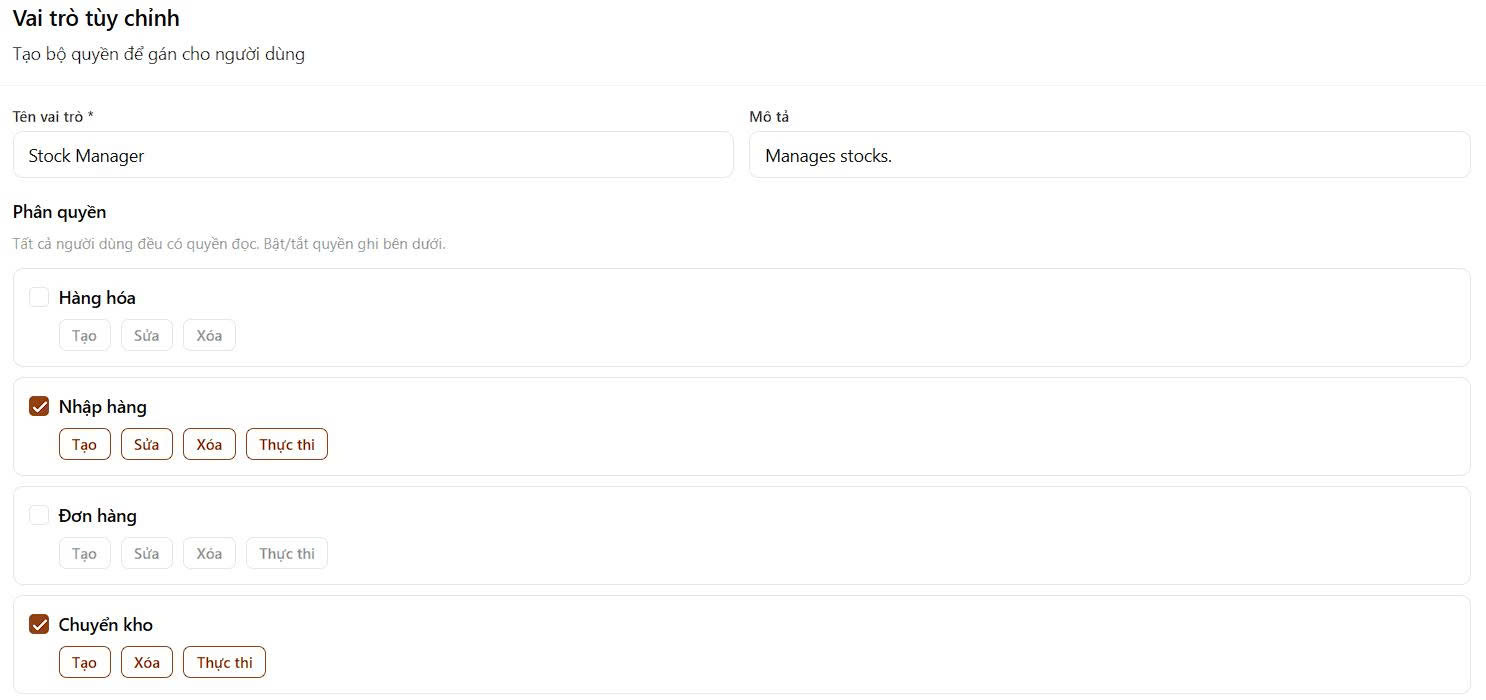
Tạo vai trò với quyền hạn cụ thể cho người nhận, người lấy, người đếm, hoặc bất kỳ quy trình tùy chỉnh nào bạn cần.
- Phân quyền theo module và hành động thay vì cấp quyền rộng gây rủi ro
- Thiết kế mẫu vai trò cho quy trình nhiều bước với trách nhiệm rõ ràng
- Cập nhật quyền an toàn khi quy trình thay đổi mà không gián đoạn vận hành
Nhật ký kiểm tra
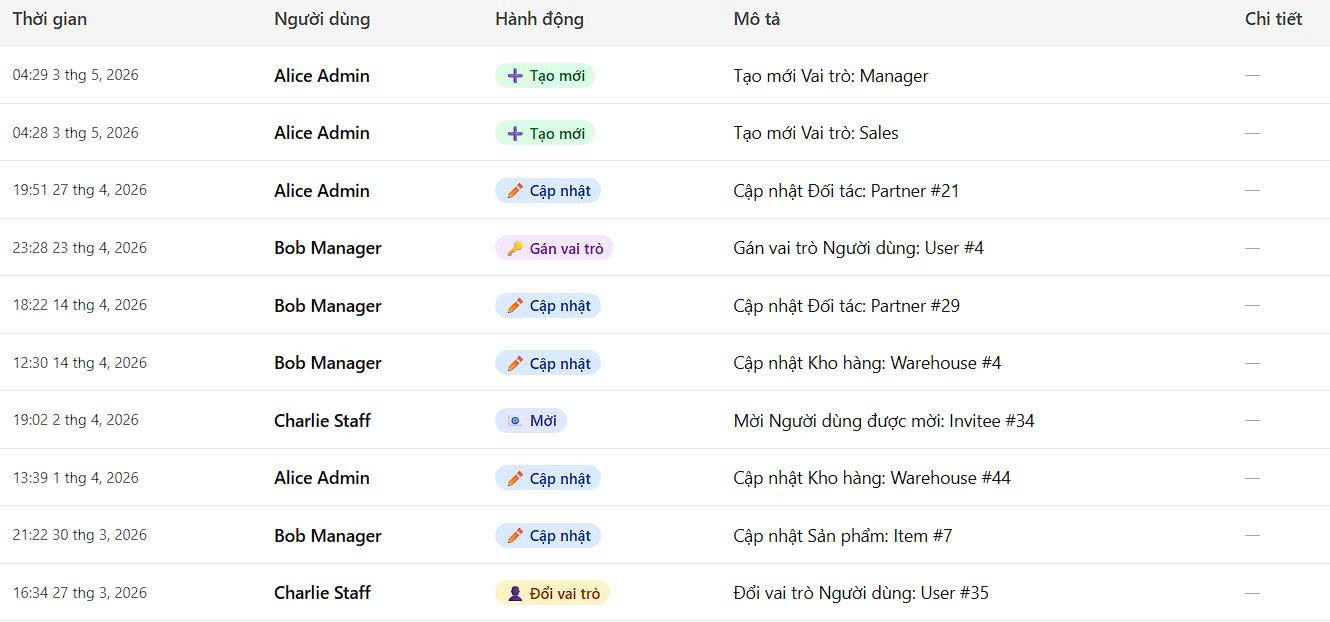
Xem ai đã tạo, chỉnh sửa, hoặc xóa mỗi giao dịch. Xuất nhật ký để tuân thủ và đào tạo.
- Ghi nhận đầy đủ chuỗi thao tác cho chuyển kho, điều chỉnh và đơn hàng
- Lọc theo người dùng, loại thao tác và khoảng thời gian để điều tra nhanh
- Dùng lịch sử rõ ràng để hỗ trợ kiểm toán tuân thủ và huấn luyện đội ngũ
Mời bằng email
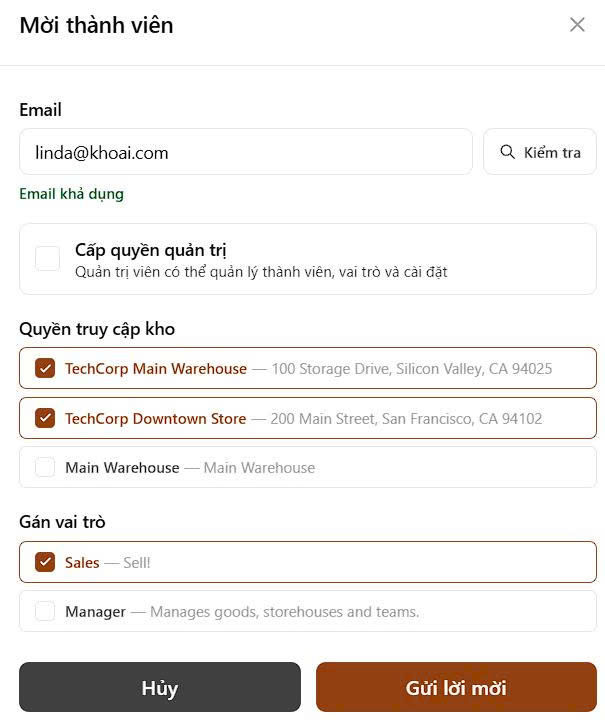
Gửi lời mời cho thành viên đội ngũ ngay lập tức. Họ có thể chấp nhận và bắt đầu làm việc ngay.
- Mời nhân sự bằng email công việc để quản lý tài khoản theo miền doanh nghiệp
- Áp vai trò đúng trước lần đăng nhập đầu tiên để đảm bảo an toàn ngay từ đầu
- Theo dõi trạng thái lời mời để nhắc thành viên đang chờ mà không cần bảng tính thủ công
Xây dựng quy trình tồn kho an toàn và tuân thủ trên cả kho và cửa hàng cùng đội ngũ của bạn
Giữ đội ngũ làm việc hiệu quả với mô hình phân quyền đúng, đồng thời bảo vệ quy trình tồn kho quan trọng.
Bắt đầu miễn phíCâu hỏi thường gặp
- Có. Ngoài các vai trò có sẵn Quản trị, Giám sát, Người vận hành và Người xem, bạn có thể tạo vai trò tùy chỉnh với quyền đặt theo từng mô-đun và thao tác — phù hợp cho người nhận, người lấy, người đếm hoặc bất kỳ vị trí nào theo quy trình.
- Gửi lời mời qua email công việc từ trang cài đặt Đội ngũ. Người được mời nhận liên kết, chấp nhận và tài khoản được kích hoạt với vai trò bạn chỉ định — sẵn sàng làm việc ngay từ lần đăng nhập đầu tiên.
- Có. Mọi giao dịch — chuyển kho, điều chỉnh, đơn hàng, thay đổi vai trò — đều được ghi lại với người dùng, loại thao tác, dấu thời gian và trạng thái trước/sau. Nhật ký có thể được lọc và xuất để kiểm tra tuân thủ hoặc đào tạo nội bộ.
- Có. Quyền theo địa điểm được tích hợp trong mô hình phân quyền, cho phép bạn cấp cho đội kho một địa điểm toàn quyền truy cập địa điểm của họ trong khi giữ các địa điểm khác riêng tư.
- Số lượng chỗ phụ thuộc vào gói của bạn. Xem trang Bảng giá để biết giới hạn theo từng gói. Bạn có thể điều chỉnh gói bất kỳ lúc nào khi đội ngũ phát triển.